Monitor all computer activity and Internet use at the office or at home. Automatically track visited web-sites addresses, record all keystrokes and passwords, save clipboard contents, take screenshots of the desktop and working application windows.
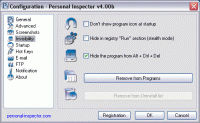
Personal Inspector is an employee monitoring/parental control tool that monitors all computer activity and Internet use. It can automatically track addresses and titles of all visited web pages, record all keystrokes (including passwords), save contents of Windows clipboard and take screen captures of the desktop and working application windows. All collected data is stored in the secret directory on the local computer and can be accessed anytime from this machine or via the local network. The software is very easy to use, small, fast-running and takes little system resources. It can be used at the office to monitor computer activity of employees and find out if they misuse corporate resources or spend too much time on their personal needs, what applications they are running and which Internet resources they visit (this may help you prevent Internet abuse and reduce the risk of liability). Personal Inspector can also be used as a parental control and surveillance tool to monitor what family members are doing on your computer and tracking their Internet use. Other possible areas of application for this tool are school and university computer labs and Internet cafes, where it can be used for analyzing computer activity of students/visitors and preventing abuse of software licenses and installation of undesired software. If you want to hide the program from the users, you can enable it to load on Windows startup and quietly run in the background. In the stealth mode Personal Inspector does not show up in the Registry and Task Manager, it can also be removed from the Programs menu and the Install/Uninstall list. The customizable hot keys enable you to start and stop monitoring, display and hide the program window, view reports based on the collected data or quit the program completely. Requirements: N/A Operating system: Win95,Win98,WinME,WinXP,WinNT 3.x,WinNT 4.x,Windows2000,Windows2003 Limitations: No Release notes: Major Update
Observes the files which are placed on your computer at the time of the software installations, downloads, Internet connections... or other events!
Price: $24.90, Rating: 9.33, Downloads: 134 Download
Handy Keylogger - superior stealth computer monitoring software for family and business use! With Handy Keylogger you can: record keyboard keystrokes, passwords, capture desktop activity, monitor internet usage, log chats and emails!
Price: $39.00, Rating: 9, Downloads: 114 Download
Freeware Smart Phone forensic utility examines mobile phonebook detailed information like text messages, contact name and numbers, operating system registry, installed applications, display file name and generates report in TEXT or HTML file format.
Price: $79, Rating: 8, Downloads: 107 Download
SystemSleuth is a computer surveillance program that secretly monitors all activity on your computer. View emails, passwords, instant messages, webcam images, printer activity, visited websites, microphone sounds, keyboard activity, and much more.
Price: $29.95, Rating: 10, Downloads: 94 Download
User Rating
Rating:2.2 out of
5 Based on13 ratings.
13 user reviews.

 Personal Inspector 6.20 details